

Brand Logo Slider for Magento®
Brand Logo Slider - Shop by Manufacturer Extension for MagentoMagento Brand logo slider extension help store owners to create and display their popular and latest manufacturers and brands in the responsive slider at the homepage, category, and product page. Help shoppers to purchase through the products manufacturers or suppliers scrolling logo carousel.
- Highlight the famous brands with their long, which you sell in your store.
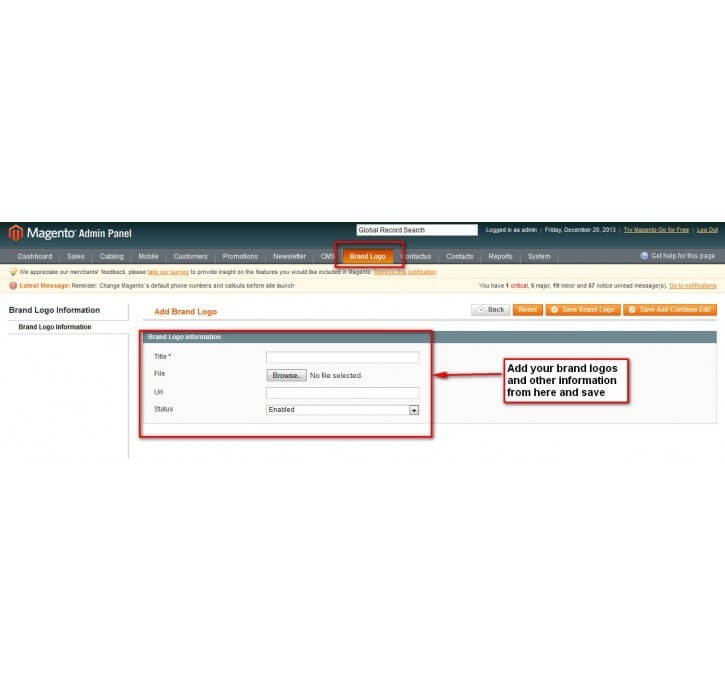
- Upload a brand logo with a redirection to allow customers to shop from that brand.
- The extension will showcase the brand logo in a responsive slider.
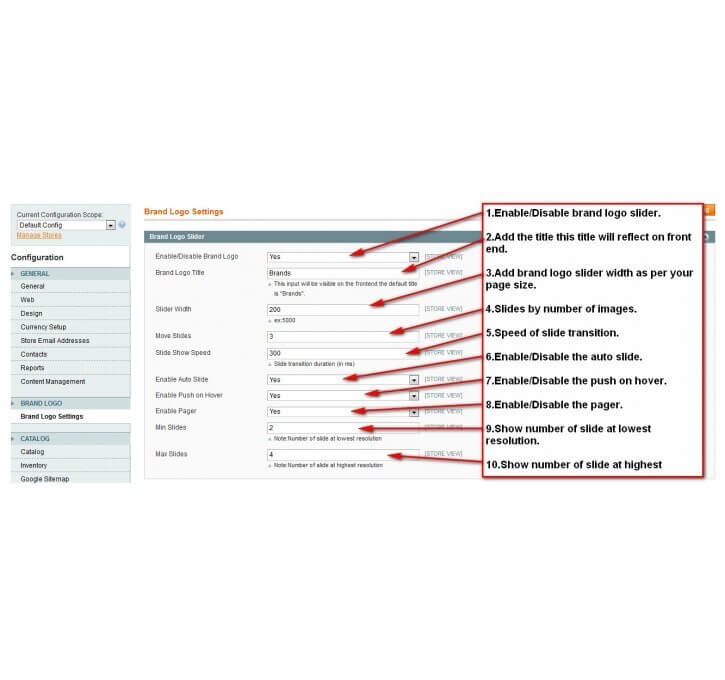
- Option to customize the title and width as per your needs.
- The extension has features to autoplay the slider and the admin can adjust the speed of the slider as well.
- Option to enable Pause on Hover when customers hover over the slider.
- Easy to install and customize the extension.
- Set the resize criteria from backend and the extension will resize your brand logo while uploading from the backend interface.
- It helps in increasing the trust and loyalty of customers on your store.
-
 InstantHelp Center
-
 90 DaysFree Support
-
 FreeLifetime Updates
-
 Meet MagentoStandards
Product Description
Want to improve sales of branded products that you are selling on your Magento store? Any online store owner needs to showcase what brands they are selling through their store. It significantly affects your customers’ shopping habits on online platforms. Because prestigious brands can persuade customers’ minds more efficiently. Also, customers tend to stay loyal to a brand that provides a great deal of value and product experience. Sometimes, customers would just purchase something from their favorite brand without the actual need. So, highlighting customers' favorite brands would surely improve your sales and conversion.
Mconnect Brand Logo Slider Extension for Magento allows you to highlight brand logos in the form of a slider. The extension will create responsive and elegant sliders to display popular brands at home, category, and product pages. It provides you an option to set redirection from the brand logo slider to the brand’s products. Also, the extension comes with many simple customization and features that enhance the visual effect for your customers. The admin can enable the auto slider feature and control the speed of the slider as well. And there is an option to enable the Pause on Hover, which means slider will pause when a user hovers over it. The extension lets you set the resize criteria from the backend to adjust the size of the logo as per your needs. And all of these prove how great this extension is, which helps in boosting sales and conversion.
For example, a fashion store running on the Magento platform needs a module like this to showcase the brands they sell. As the fashion stores sell products of many famous brands and most online shopper shop only branded apparels. Therefore, highlighting such brands would be beneficial for a store owner to increase revenue.
So, all in all, the extension is great for all the Magento stores that sell items from famous brands. It helps customers to find products of their favorite brands as quickly as possible. And ultimately, it boosts the sales and conversion of your branded store.
Functionality Included in Extension
-

Auto Sliding
Shop by brands magento extension can perform auto sliding. It requires you to set a time limit and then it slides your brand images on automated mode. With its sliding and continuous movements, it succeed very much efficiently in grabbing your shoppers attention. You can also turn this auto sliding off from your control panel.
-
Pause On Hover
It happens a lot, when your visitors are visiting your website and they find something interesting in your slides. They want to see that slide and want to go through it, but it keeps moving again and again, which make your users irritated and you might end up loosing a customer.
For such instances, product brand logo that is build for improving UI, gives you the functionality of pausing the moving slides with just a Hover of mouse. You can turn this pause on hover on and off as per your requirements.

-

Enabling Pagers
Slider manufacturer also comes with pager facility. Pagers enable your users to directly see a slide that is located on the screen. This functionality is helpful when you have multiple slides more in counts.
This is very similar to the Pause On Hover feature and can be a substitute for this. This pagers can also be toggled disabled or enabled from your admin panel as per your requirements.
-
Add Link To Image
This extension lets you advance to add links on the images of the slides through which you can redirect your user to any specific page.
It can be done right form your admin panel, all you need to do is to add the link of the page where you want to send your shoppers on the slide and whenever a user will show interest on that specific slide by clicking it, you will receive a positive prospect for you. It works as a call to action right from the first page of your website.

ADD TO ANY CMS PAGE
-
For displaying on any cms page paste the following code in your cms page
For showing in any template (.phtml) file paste the following code in your template file:
<?php echo $this->getLayout()->createBlock('brandlogo/brandlogo')- >setTemplate('brandlogo/brandlogo.phtml')->toHtml(); ?>
FOR MAGENTO > 1.9.2.2
You need to allow permissions to block Here.and set is allow yes.




Why Our Extension

Need help in Magento website?
Do you have a question, problems or custom requirements for your website? Big or small, No matter, we're here if you feel you need support, help or consultation. Talk to us!
Get Free ConsultationRecent Blog Post
- SignCatch and Rapidor Accomplished The First B2B Transaction Using ONDC
- Ultimate Guide on Magento 2 Development Best Practices in 2024
- AWS vs Azure: A Security Comparison for Your eCommerce Businesses
- Global eCommerce Logistics Market Report 2023: Market Value $1 Trillion by 2027
- Video Marketing: Build Successful Video Strategy for Shopify Store in 2023
- How to Improve User Experience in Magento 2: UX/UI Design Strategies
- How Much Does it PPC Management Cost in 2024?
- Shopify Guide: How to Develop Product Development Strategy That Work
- Top 10 Customer Retention Strategies for Ecommerce Merchants to Increase Revenue
Recent Product
-
 Shipping and Payment Method per Customer Group for Magento 2
-
Product Label, Ribbon Extension for Magento 2
-
Product Icon Logo Gallery Extension for Magento 2
-
Shipping Rules for Magento 2 - Custom Shipping Method
-
Product Attachment Extension for Magento 2 - File Upload
-
Mconnect Fast Cart Checkout Extension for Magento 2
-
Store Locator Google Map Extension for Magento 2
-
Track Order & Shipment Status Extension for Magento 2
-
Gift Card & Certificate Extension for Magento 2
-
Product Image Flipper Extension for Magento 2
-
Ajax Price Slider / Filter Extension for Magento 2
-
Ajax Product Infinite Scroll Extension For Magento 2
-
Advanced Product FAQ Extension for Magento 2
-
Advance Matrix Rate Shipping Extension for Magento 2
Subscribe to get discount coupons & new releases.
Product Description
Want to improve sales of branded products that you are selling on your Magento store? Any online store owner needs to showcase what brands they are selling through their store. It significantly affects your customers’ shopping habits on online platforms. Because prestigious brands can persuade customers’ minds more efficiently. Also, customers tend to stay loyal to a brand that provides a great deal of value and product experience. Sometimes, customers would just purchase something from their favorite brand without the actual need. So, highlighting customers' favorite brands would surely improve your sales and conversion.
Mconnect Brand Logo Slider Extension for Magento allows you to highlight brand logos in the form of a slider. The extension will create responsive and elegant sliders to display popular brands at home, category, and product pages. It provides you an option to set redirection from the brand logo slider to the brand’s products. Also, the extension comes with many simple customization and features that enhance the visual effect for your customers. The admin can enable the auto slider feature and control the speed of the slider as well. And there is an option to enable the Pause on Hover, which means slider will pause when a user hovers over it. The extension lets you set the resize criteria from the backend to adjust the size of the logo as per your needs. And all of these prove how great this extension is, which helps in boosting sales and conversion.
For example, a fashion store running on the Magento platform needs a module like this to showcase the brands they sell. As the fashion stores sell products of many famous brands and most online shopper shop only branded apparels. Therefore, highlighting such brands would be beneficial for a store owner to increase revenue.
So, all in all, the extension is great for all the Magento stores that sell items from famous brands. It helps customers to find products of their favorite brands as quickly as possible. And ultimately, it boosts the sales and conversion of your branded store.
Functionality Included in Extension
-
Auto Sliding
Shop by brands magento extension can perform auto sliding. It requires you to set a time limit and then it slides your brand images on automated mode. With its sliding and continuous movements, it succeed very much efficiently in grabbing your shoppers attention. You can also turn this auto sliding off from your control panel.
-
Pause On Hover
It happens a lot, when your visitors are visiting your website and they find something interesting in your slides. They want to see that slide and want to go through it, but it keeps moving again and again, which make your users irritated and you might end up loosing a customer.
For such instances, product brand logo that is build for improving UI, gives you the functionality of pausing the moving slides with just a Hover of mouse. You can turn this pause on hover on and off as per your requirements.
-
Enabling Pagers
Slider manufacturer also comes with pager facility. Pagers enable your users to directly see a slide that is located on the screen. This functionality is helpful when you have multiple slides more in counts.
This is very similar to the Pause On Hover feature and can be a substitute for this. This pagers can also be toggled disabled or enabled from your admin panel as per your requirements.
-
Add Link To Image
This extension lets you advance to add links on the images of the slides through which you can redirect your user to any specific page.
It can be done right form your admin panel, all you need to do is to add the link of the page where you want to send your shoppers on the slide and whenever a user will show interest on that specific slide by clicking it, you will receive a positive prospect for you. It works as a call to action right from the first page of your website.
ADD TO ANY CMS PAGE
-
For displaying on any cms page paste the following code in your cms page
For showing in any template (.phtml) file paste the following code in your template file:
<?php echo $this->getLayout()->createBlock('brandlogo/brandlogo')- >setTemplate('brandlogo/brandlogo.phtml')->toHtml(); ?>
FOR MAGENTO > 1.9.2.2
You need to allow permissions to block Here.and set is allow yes.
| List Page Point | Nice product manufacturer brand logo slider user interface to boost sales with more presence. |
|---|
Pre-Sale Enquiry
Do you have an question? Please ask us. We will respond you within 24 hours. Create a support ticket.
Need Customization?
Please share your business specific extension customization requirement. Talk to our Magento developer!