Short answer: Magento 2.4.9 (released May 12, 2026) changes the stack under your store: MySQL 8.4 or MariaDB 11.4 only, PHP 8.5 support, a new admin editor and new framework pieces. Most problems come from extensions and custom code built for the old stack. An audit first, then a staging upgrade, keeps your Magento 2.4.9 upgrade safe.
Picture a weekend upgrade that seems to go well. The site comes back up. Homepage fine, categories fine. Then on Monday the team tries to edit a CMS page and the editor is blank. And the product import just hangs.
Nothing on the storefront had changed. Everything underneath had.
That is the honest summary of Magento 2.4.9. Adobe itself did not position it as a big feature release. It is a modernization release, with the largest number of fixes of any 2.4.x version: about 501 in Magento Open Source and 560 in Adobe Commerce.
What changed underneath
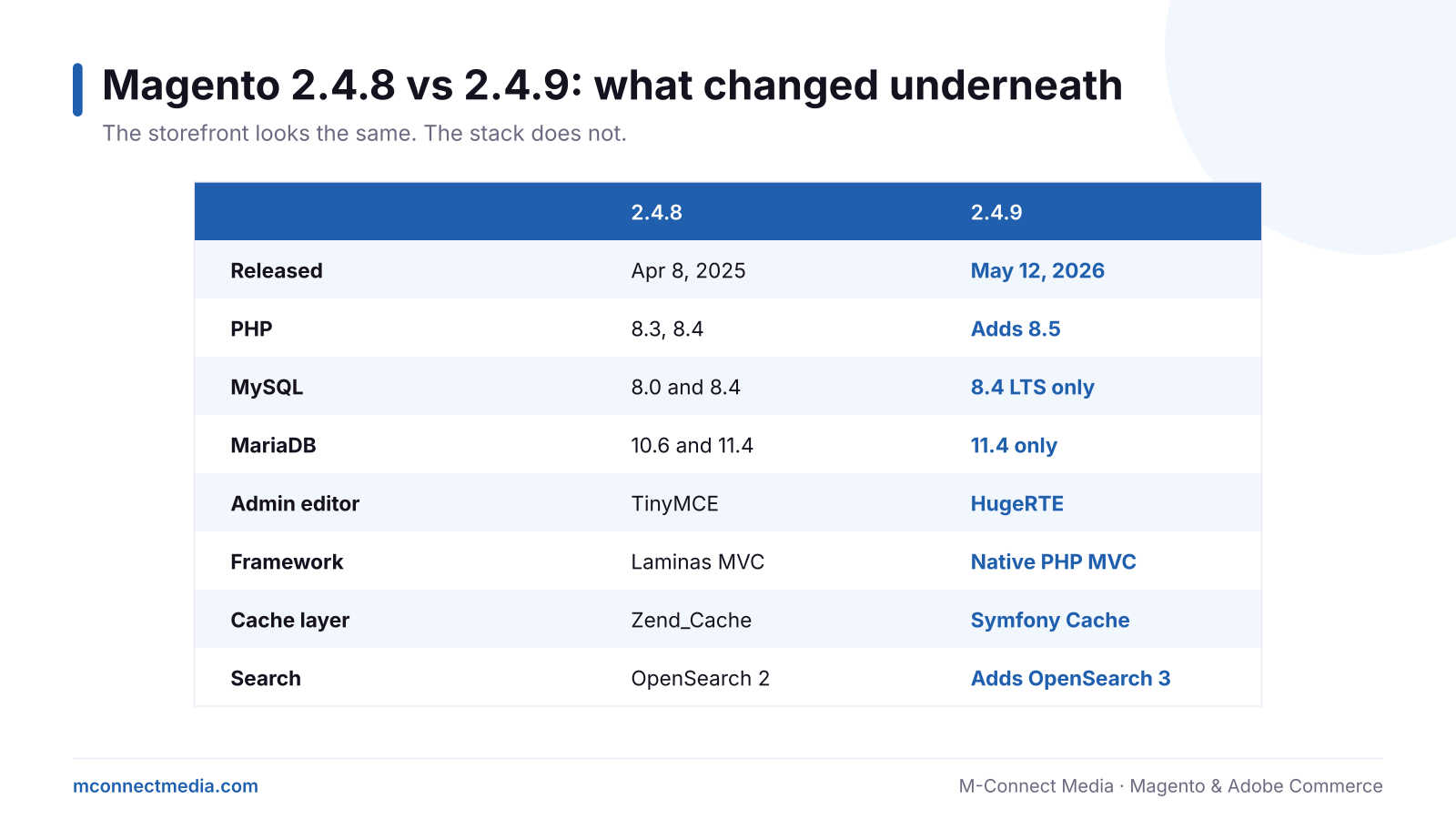
- Database: MySQL 8.4 LTS only, or MariaDB 11.4 only. If your host still runs MySQL 8.0 or MariaDB 10.6, the database has to be upgraded too.
- PHP: adds PHP 8.5 support. Older extensions that relied on deprecated PHP behavior can fail here.
- Admin editor: TinyMCE is replaced by HugeRTE, an open-source fork, because newer TinyMCE licensing did not fit Magento’s open-source model. Extensions that hook into the old editor can break the admin.
- Framework: Laminas MVC is replaced by a native PHP implementation, and Zend_Cache by Symfony Cache. Custom modules that call those old classes directly need changes.
- Search: OpenSearch 3 is now supported, which can make layered navigation and search faster.
What actually breaks in a Magento 2.4.9 upgrade
Magento core usually upgrades cleanly. The trouble lives around it, which is why we start every Magento upgrade with a Magento code audit:
- Abandoned extensions. A module whose vendor stopped updating it years ago. This is the single biggest cause of failed upgrades.
- Editor add-ons. Page builders, widgets or WYSIWYG plugins built around TinyMCE.
- Custom code using old framework classes. Often written by a previous developer, with no tests.
- Import and export tools. Data feeds, ERP connectors and import jobs that assume old behavior.
- Hosting. The server simply does not offer the required database or PHP versions.
How we run a safe Magento 2.4.9 upgrade
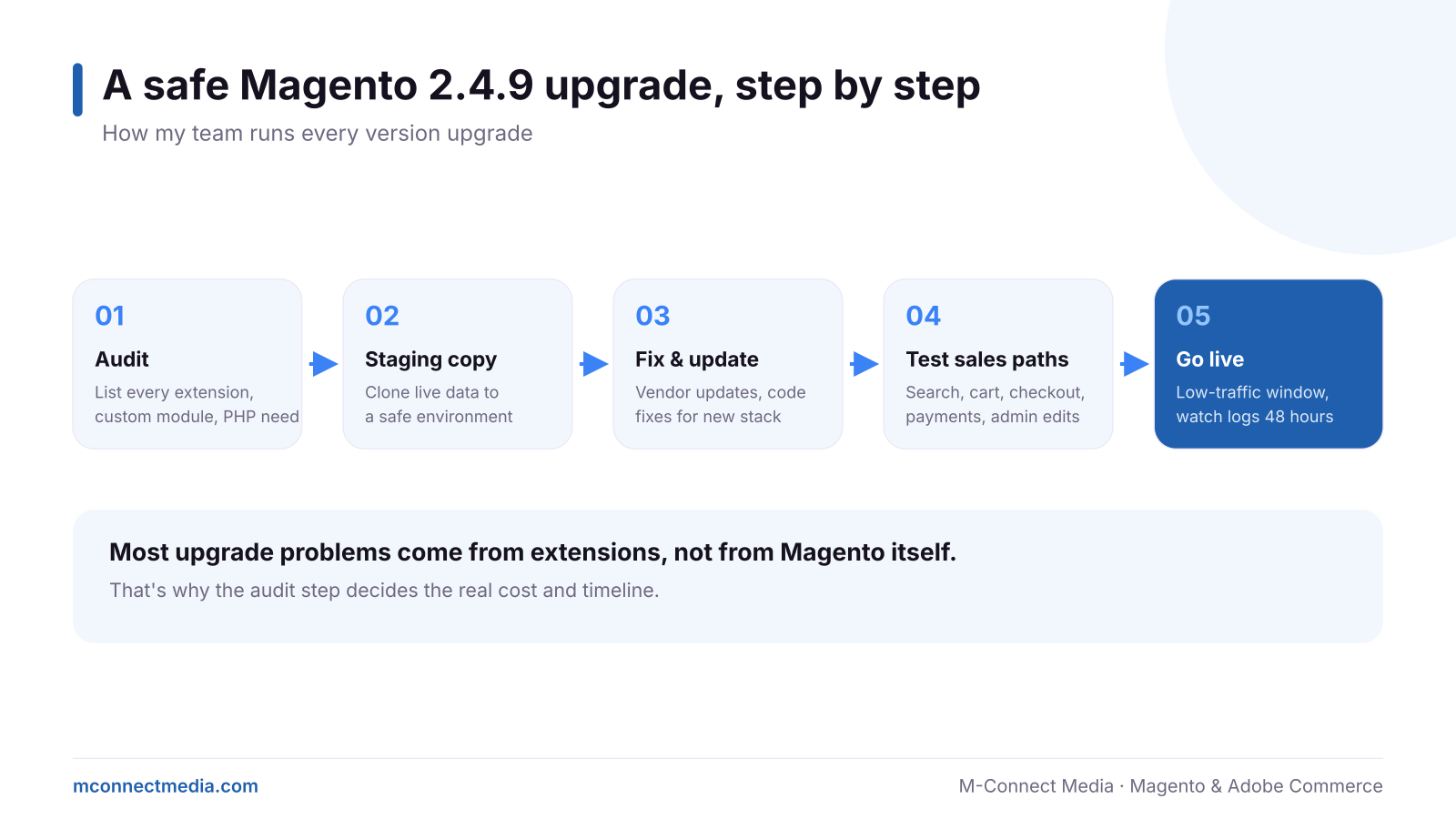
- Audit. List every extension, its version and whether the vendor supports 2.4.9. Scan custom code for old framework calls. Check the host.
- Staging copy. Clone the live store and database to a safe environment with the new PHP and database versions.
- Fix and update. Update supported extensions, replace dead ones, patch custom code.
- Test the sales paths. Search, filters, cart, checkout, every payment method, emails, admin editing, imports and integrations.
- Go live. In a low-traffic window, with a tested rollback, then watch logs closely for 48 hours.
Should you upgrade now or wait?
If you are on 2.4.6 or older, you are already outside regular support and should move now. If you are on 2.4.7, support ends April 9, 2027, so plan it for January or February, after the holidays. If you are on 2.4.8, you have until April 2028, but upgrading early spreads the cost and keeps you current with monthly security patches.
One rule we hold to: do not upgrade in the weeks before Black Friday. Plan it for the quiet season.
Get a fixed-scope upgrade plan
M-Connect Media’s Magento upgrade service starts with a compatibility audit, so you know the real cost before any code changes. Then we upgrade on staging, test every sales path and go live with a rollback ready.
FAQ
Can I upgrade from 2.4.8 straight to 2.4.9?
Yes. Stores on 2.4.8 can upgrade directly. From older versions it is still possible, but the jump is bigger and needs more testing.
How long does a 2.4.9 upgrade take?
For a standard store, roughly two to six weeks including extension work and testing. Heavily customized stores take longer.
Will customers notice anything?
They should not, apart from possibly faster search. If an upgrade is done right, the only people who notice are your admin team.
Sources
- Magento 2.4.9 release details and system requirements
- Adobe Commerce and Magento release schedule
- Magento 2.4 versions end of support